
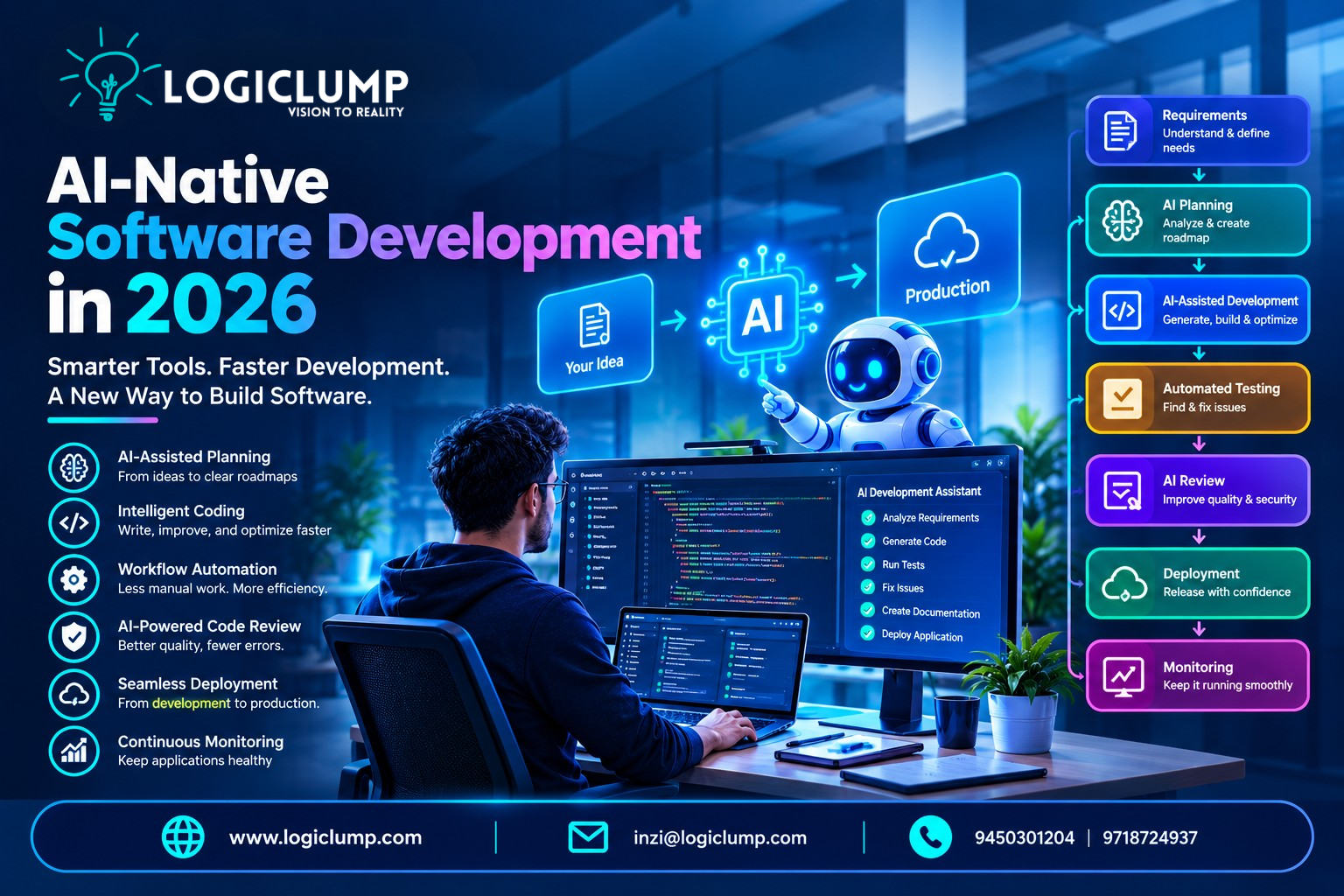
AI-Native Software Development in 2026
Software development is going through a major transformation.
For decades, developers have relied on programming languages, frameworks, databases, cloud platforms, version-control systems, testing tools, and deployment pipelines to create applications. Artificial intelligence first entered this process as a productivity assistant, helping developers complete code, understand errors, and generate small pieces of functionality.
That role is expanding rapidly.
In 2026, AI is becoming part of much more than the coding stage. Modern AI development tools can assist with requirements, technical planning, implementation, testing, debugging, documentation, code review, and other engineering activities.
This evolution is commonly referred to as AI-native software development.
Instead of treating AI as an additional tool placed beside the development process, organizations are beginning to design development workflows around AI from the start.
The result is a different approach to building software—one where developers and AI systems collaborate throughout the application lifecycle.
What Does AI-Native Software Development Mean?
AI-native software development refers to a development approach in which artificial intelligence is deeply integrated into the processes used to design, build, test, and maintain software.
A conventional development workflow may look like:
Requirements → Design → Development → Testing → Review → Deployment → Maintenance
An AI-native workflow can add intelligent capabilities throughout those stages:
Requirements → AI Planning → AI-Assisted Development → Automated Testing → AI Review → Deployment → Monitoring
The purpose is not to remove developers from the process.
Instead, AI can take care of repetitive, time-consuming, or clearly defined activities while developers concentrate on architecture, product requirements, security, quality, and technical decisions.
Why AI-Native Development Is Becoming Important
Businesses are under increasing pressure to release software quickly.
They need:
- Faster product launches
- Frequent feature updates
- Better customer experiences
- AI-powered functionality
- Mobile and web applications
- Automated business processes
- Reliable cloud infrastructure
- Strong application security
At the same time, applications are becoming more complicated.
Modern products may contain multiple APIs, databases, cloud services, third-party integrations, mobile clients, analytics systems, and AI components.
AI can help engineering teams manage some of this complexity by assisting with tasks across the development lifecycle.
The important change is that AI is moving from code assistance toward workflow assistance.
From Code Completion to AI Coding Agents
Early AI development tools were mainly focused on suggesting code.
A developer could begin writing a function and receive an automatically generated completion.
Today's AI coding agents can operate at a broader task level.
For example, a developer could request:
"Add a secure password-reset workflow to this application."
Depending on the tools and permissions available, an AI agent may be able to:
- Examine the existing project structure.
- Locate the authentication components.
- Understand related database models.
- Suggest an implementation plan.
- Modify relevant backend code.
- Create frontend components.
- Add validation.
- Generate automated tests.
- Run the test suite.
- Investigate failures.
- Make corrections.
- Prepare the changes for developer review.
This represents a significant shift in how developers can interact with software tools.
The developer provides the objective and constraints, while the AI assists with the implementation work.
Development Is Becoming More Goal-Driven
Traditional programming often requires developers to specify implementation details step by step.
AI-native workflows can operate at a higher level.
A developer may provide:
- The desired outcome
- Business requirements
- Technical restrictions
- Security rules
- Existing architecture
- Testing expectations
The AI can then help translate those requirements into individual engineering tasks.
This changes the developer's role from simply writing instructions to also defining goals, constraints, and acceptance criteria.
However, understanding the implementation remains important because AI-generated solutions still need to be evaluated.
AI Across the Software Development Lifecycle
AI-native development is broader than automated coding.
AI can contribute to multiple stages of software engineering.
Requirements and Product Analysis
Business requirements are often written in simple language.
AI can help convert them into more detailed technical requirements.
For example, a requirement such as:
"Users should receive notifications when their order changes."
could lead to considerations involving:
- Notification preferences
- Order-status events
- Backend APIs
- Database changes
- Email or push notifications
- Failure handling
- Authentication
- Testing scenarios
This can help teams identify technical requirements earlier.
Project Planning
Large software projects can be divided into smaller development tasks.
AI can assist with creating technical task lists, identifying dependencies, and suggesting implementation sequences.
For example, an online marketplace might require:
User Accounts → Products → Search → Cart → Payments → Orders → Notifications → Admin → Analytics
AI can help organize these areas while developers determine the appropriate architecture.
Code Generation
AI can generate many types of development artifacts, including:
- Backend functions
- API endpoints
- Database queries
- Frontend components
- Configuration files
- Automation scripts
- Test cases
- Documentation
The advantage is not simply producing code faster.
AI can also help developers move from an idea to a working prototype more quickly.
Code Review
AI can examine proposed changes and identify potential concerns.
These may include:
- Missing validation
- Possible logic problems
- Duplicate implementation
- Security weaknesses
- Poor error handling
- Inconsistent coding patterns
- Performance concerns
AI review can act as an additional layer of assistance, while human engineers remain responsible for final approval.
Testing
Testing is another area where AI can reduce repetitive work.
AI tools can help generate:
- Unit tests
- Integration tests
- API tests
- User-interface tests
- Regression scenarios
- Edge cases
They can also analyze failed tests and suggest possible causes.
Debugging
Finding the cause of an application failure can consume significant engineering time.
AI can examine information such as:
- Error messages
- Stack traces
- Application logs
- Recent code changes
- Test results
- Runtime behavior
It can then suggest potential fixes or areas that deserve investigation.
Documentation
AI can also assist with documentation.
It can help produce:
- API references
- Setup guides
- README files
- Technical explanations
- Code documentation
- Architecture summaries
This can make it easier for teams to keep technical information accessible.
How AI Is Changing the Developer's Role
AI-native development does not make software engineering knowledge irrelevant.
It changes where developers may spend their time.
Instead of focusing primarily on repetitive implementation, developers can dedicate more attention to:
- System architecture
- Business logic
- User requirements
- Security
- Data design
- Performance
- Scalability
- AI orchestration
- Testing strategy
- Technical decisions
The ability to evaluate AI-generated work becomes an important engineering skill.
A developer still needs to understand whether a proposed solution is secure, maintainable, scalable, and appropriate for the application.
Smaller Teams and Broader Engineering Skills
AI can allow development teams to handle a wider range of responsibilities.
A modern engineer may increasingly work across areas such as:
- Frontend development
- Backend systems
- Cloud infrastructure
- Databases
- APIs
- AI integrations
- Security
- Automation
This can be particularly useful for startups and smaller product teams.
However, AI should not be viewed simply as a replacement for engineering expertise.
Strong technical judgment is still required to guide AI systems effectively.
Multi-Agent Software Development
Another emerging direction is the use of multiple specialized AI agents.
Instead of assigning every task to one AI system, organizations can create different agents for different responsibilities.
For example:
Planning Agent
Analyzes requirements and creates development tasks.
Development Agent
Works on implementation.
Testing Agent
Creates and executes tests.
Security Agent
Reviews the application for potential vulnerabilities.
Documentation Agent
Updates technical documentation.
A coordinating system can connect these agents into one workflow.
This approach can be useful for complex projects, but organizations also need to control communication, permissions, data access, and execution boundaries.
More agents do not automatically produce better software.
AI-Native Application Architecture
The rise of AI also affects the architecture of the applications being developed.
AI-powered applications may require components such as:
- AI models
- Agent orchestration
- APIs
- Vector databases
- Event-driven systems
- Data pipelines
- Tool integrations
- Observability systems
- Secure agent identities
This means architecture decisions should consider future AI integration.
For example, a business application may eventually need to allow an AI agent to retrieve information or perform specific operations through APIs.
A well-designed architecture can make these integrations easier and safer.
APIs Are Becoming the Connection Layer
APIs provide controlled communication between software systems.
For AI agents, they can become the primary way to interact with business applications.
Examples include:
AI Agent → CRM API → Customer Information
AI Agent → Inventory API → Product Availability
AI Agent → Analytics API → Business Reports
AI Agent → Payment API → Transaction Workflow
This makes API architecture increasingly important.
AI-connected APIs should have appropriate:
- Authentication
- Authorization
- Input validation
- Rate limits
- Credential protection
- Logging
- Monitoring
An AI agent should receive access only to the operations required for its role.
Security in AI-Native Development
AI introduces additional security considerations into the development process.
AI systems may process information from users, websites, documents, repositories, and external services.
They may also have permission to use tools or access APIs.
Potential risks include:
- Prompt injection
- Sensitive-data exposure
- Unauthorized actions
- Excessive permissions
- Malicious documents
- Insecure generated code
- Credential leakage
- Unsafe API calls
For this reason, AI-generated software should go through the same type of security validation expected from manually developed software.
AI can accelerate development, but it does not guarantee secure development.
Sandboxes for AI Agents
AI agents capable of executing commands or changing project files need controlled environments.
Sandboxing can restrict what an AI system can access or execute.
For example, an agent working on a software project might be allowed to:
- Read project files
- Modify selected files
- Run tests
- Install approved dependencies
while being prevented from:
- Accessing unrelated credentials
- Modifying production systems
- Removing critical resources
- Accessing sensitive infrastructure
This type of isolation can reduce the consequences of unexpected or unsafe agent behavior.
Observability Becomes More Important
Traditional application monitoring tracks things such as errors, requests, infrastructure health, and performance.
AI-native systems require additional visibility.
Engineering and security teams may need to understand:
- Which AI agent performed an operation
- Which model was involved
- Which tools were used
- Which APIs were called
- What resources were accessed
- Where a workflow failed
- Which actions required approval
- How much AI infrastructure was consumed
This information can help with debugging, security investigations, performance analysis, and cost management.
Human Oversight Still Matters
AI-native development does not mean every software task should be fully automated.
Different tasks can have different risk levels.
Lower-Risk Activities
AI may be able to work with limited supervision on tasks such as:
- Documentation
- Formatting
- Test generation
- Simple refactoring
- Draft code
Moderate-Risk Activities
Human review can remain important for:
- New features
- Database changes
- API modifications
- Dependency changes
High-Risk Activities
Additional approval is appropriate for sensitive operations such as:
- Production deployments
- Access-control changes
- Financial systems
- Security configuration
- Destructive database operations
- Critical infrastructure changes
The goal is controlled automation rather than unrestricted automation.
Measuring AI Development Success
A company should not measure AI development solely by how much code an AI system produces.
A large amount of generated code does not necessarily represent successful software development.
Better measurements can include:
- Development cycle time
- Release frequency
- Defect rates
- Testing coverage
- Code-review effort
- Production incidents
- Developer productivity
- Infrastructure expenses
- Customer satisfaction
The most meaningful question is:
Is AI helping the organization build better software more efficiently?
AI-Native Development and Cloud Infrastructure
AI applications often require flexible infrastructure.
Depending on the workload, organizations may need:
- Cloud compute
- GPU resources
- Containers
- Scalable storage
- Model APIs
- Secure networking
- Monitoring
- Automated deployment
Cloud-native architecture can make it easier to scale these resources according to application demand.
However, AI infrastructure can also increase operational costs, so businesses need effective usage monitoring and cost controls.
The Development Environment Is Changing
Traditional development environments were designed mainly for humans editing source files.
AI agents introduce another possibility.
Developers may increasingly work in environments where they can:
- Assign development tasks
- Monitor AI activity
- Review generated changes
- Run tests
- Inspect tool usage
- Compare implementations
- Approve actions
- Continue previous AI sessions
This turns the development environment into more than a code editor.
It becomes a workspace for coordinating software engineering activities.
Challenges Businesses Need to Consider
AI-native development has significant potential, but it also introduces new challenges.
Quality Control
AI-generated solutions can contain errors or misunderstand requirements.
Security
AI-generated code and autonomous actions require appropriate security controls.
Context Management
Complex applications can contain large amounts of technical information that AI systems may not fully understand.
Cost
Large AI workflows can consume substantial model and infrastructure resources.
Technical Debt
Rapid generation without proper review can create unnecessary complexity.
Governance
Organizations need policies governing AI tools, data access, code generation, and autonomous actions.
Developer Skills
Engineers need to learn how to work effectively with AI systems while maintaining strong software-engineering fundamentals.
How Businesses Can Prepare for AI-Native Development
Organizations do not need to automate their entire development department immediately.
A gradual approach can be more practical.
Step 1: Find Repetitive Work
Identify development tasks that consume considerable time and have clear outcomes.
Step 2: Introduce AI Assistance
Begin with areas such as documentation, coding assistance, testing, and code review.
Step 3: Improve Engineering Foundations
AI workflows benefit from well-maintained projects with:
- Clear architecture
- Reliable tests
- Good documentation
- Version control
- Automated CI/CD
Step 4: Establish Permissions
Define what AI tools and agents are allowed to read, modify, execute, and deploy.
Step 5: Create Review Policies
Specify which AI-generated changes require developer approval.
Step 6: Monitor Usage
Track model consumption, infrastructure expenses, execution time, and productivity.
Step 7: Expand Carefully
Once the workflow is reliable, organizations can gradually introduce more autonomous development tasks.
AI-Native Development for Startups
Startups often operate with limited engineering resources.
AI can help small teams accelerate:
- MVP development
- Prototyping
- UI implementation
- API development
- Testing
- Documentation
- Automation
- Cloud configuration
This can shorten the distance between an idea and an initial working product.
However, speed should not come at the expense of architecture.
A poorly designed system can become expensive to maintain as the company grows.
AI-Native Development for Enterprises
Large organizations have different requirements.
Enterprise environments often contain:
- Legacy applications
- Multiple development teams
- Complex infrastructure
- Sensitive data
- Strict compliance requirements
- Multiple cloud environments
AI adoption therefore needs strong governance.
Enterprises may need centralized controls for:
- AI models
- Agent identities
- Data access
- Security
- Monitoring
- Compliance
- Developer workflows
The objective is to make AI available to engineering teams without losing control over enterprise systems.
The Future of Software Engineering
Software development is likely to become increasingly collaborative between humans and AI.
Developers may spend more time defining:
What the application needs to achieve
while AI systems increasingly assist with:
How individual implementation tasks can be completed.
This does not make engineering knowledge less valuable.
Architecture, security, system design, data modeling, business understanding, and technical judgment remain essential.
As AI becomes more capable, developers may increasingly act as architects, reviewers, orchestrators, and decision-makers.
AI-Native Development Is Bigger Than AI Coding
It is easy to associate AI-native development with code generation.
But the concept is much broader.
It can include:
- AI-assisted requirements analysis
- Intelligent project planning
- Coding agents
- Automated testing
- AI code review
- Multi-agent workflows
- Documentation generation
- AI-assisted DevOps
- Runtime monitoring
- Secure AI infrastructure
- Automated software maintenance
The fundamental change is that AI becomes part of the development process rather than remaining an isolated coding tool.
How LogiClump Can Help
Businesses adopting AI-native development may need a combination of technologies rather than a single AI solution.
They may require:
- Custom web applications
- Mobile applications
- AI integrations
- Secure APIs
- Cloud infrastructure
- Business automation
- CRM systems
- FinTech applications
- AI-powered workflows
- Scalable backend systems
LogiClump can help businesses develop custom software solutions that combine AI, automation, APIs, cloud technologies, and modern application architecture.
The goal is to create software that can support current business requirements while remaining adaptable as AI technology continues to evolve.
Conclusion
AI-native software development is changing the way modern applications are created.
AI is moving beyond simple code suggestions and becoming involved in requirements analysis, planning, implementation, testing, debugging, documentation, code review, and other engineering activities.
At the same time, organizations must address security, quality, governance, cost, observability, and human oversight.
The future is not necessarily about replacing software engineers with AI.
It is about giving engineers increasingly capable tools that can handle more of the repetitive work while humans remain responsible for architecture, judgment, security, and business outcomes.
For companies, the opportunity is significant—but successful AI adoption requires more than adding an AI coding tool.
It requires strong engineering foundations, clear processes, secure architecture, appropriate permissions, and a thoughtful approach to automation.
AI-native development is therefore not simply a new way to write code.
It is a broader transformation in how software is planned, built, tested, secured, deployed, and maintained.
Talk to Our Team
Looking to build AI-powered applications, intelligent business software, secure APIs, automation systems, or custom web and mobile solutions?
LogiClump Technologies can help turn your technology requirements into practical and scalable software solutions.
🌐 Website: www.logiclump.com
📧 Email: inzi@logiclump.com
📞 Contact: 9450301204 | 9718724937
Build. Innovate. Empower.
Discover how AI-native software development is transorming coding, testing, architecture, DevOps, AI agents, anfd the software development lifecycle in 2026.
Tom Cruise